Scan clips and instruments
Check audio clips, Simpler samples and saved-Set Sampler references. See missing files, sample-rate mismatches and the current warp status.

Max for Live · session tools
Find the issues before the show.
Audit the audio files and clip settings in your Ableton Live Set, then review what needs attention before you rehearse or perform.

Session file health
One workspace to check your Set’s audio files, correct sample-rate mismatches and manage clip warping before rehearsal or the show.
Check audio clips, Simpler samples and saved-Set Sampler references. See missing files, sample-rate mismatches and the current warp status.
Convert eligible audio files to the Live engine’s sample rate and replace the source files, with originals backed up for recovery.
Use Warp All or Unwarp All on the Set’s audio clips while preserving their Warp Modes. Playback must be stopped, and changes need confirmation.
Scan first
Place the device on the Master track and press Scan Set. The scan reports the Live engine’s target sample rate, distinct audio files, missing files, rate mismatches and warp summaries. Audio passes through unchanged.
A successful scan fills the dashboard with real values. Dashes or an error are not a completed scan.
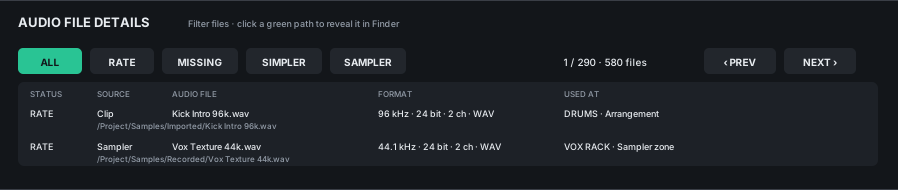
From summary to source
The paged file browser narrows the result to rate mismatches, missing files, audio clips, Simpler or Sampler. Existing paths can be revealed in the platform file manager.
Sampler discovery reflects the last saved Set, not unsaved Sampler edits. Internal libraries of third-party instruments are not exposed to the scanner. A missing-file resolver is planned; the current build reports missing files but does not search for replacements or relink them.
Deliberate recovery
Scan calculates eligible and blocked mismatches, backup size and estimated working space. Conversion requires confirmation, copies originals and their .asd files to a timestamped backup, validates a temporary conversion, then replaces the source. Restore uses the plugin-created backup manifest.
Conversion overwrites source files; it is not part of the read-only scan. Keep a separate project backup, stop playback and read the quickstart before changing media.
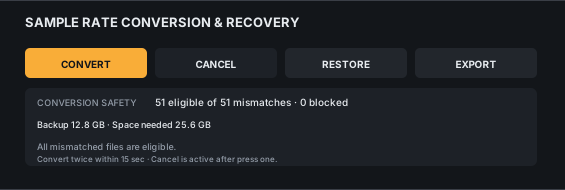
Documentation
Scan, inspect and review recovery steps before using the conversion tools.
Requires Ableton Live 11+ with Max for Live, Max 8.5+ with Node for Max, and ffprobe/ffmpeg. Live 12 is recommended. Not every third-party sample library is inspectable.
Session Diagnostics
Talk to CLR about Session Diagnostics, compatibility and release availability.